Can I Turn "Thread Preview" Off?

Ladd Jasper

Full speed, half blind
Joined
Feb 12, 2005
Messages
2,300
Reaction score
0
Location
Russia, with love
Whenever I roll my cursor over a thread title within a given forum, a box will open up with the first sentence of that thread (circled below).
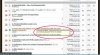
screenshot.JPG

I have no need for this feature, and find it very annoying. Is this something I can turn off or hide? Is it even in the site's software, or is it browser related (happens w/ Firefox and now Chrome)? May occur on other sites, but I'm on STR so much it's most noticeable here.

Google has not been my friend on this, so any help will be much appreciated. Thanks!
 
I'm guessing it's a VBulletin feature, controlled by the sys admin. I've never seen the preview you speak of and attached a photo of so I'm guessing either it only applies to paid subscribers or it's an add-on through FF you've installed. Check your add-ons and see if there's anything listed for VBulletin preview add-on. That theory goes out the door with you having the same problem with Chrome though. I'm almost certain it's a forum enabled feature though. See this...
http://www.vbulletin.org/forum/showthread.php?t=153835
 
I like that feature - it allows me to preview a thread without having to click on it and open the thread then hit the back button when I'm done reading it. Much faster for me.
 
I like that feature - it allows me to preview a thread without having to click on it and open the thread then hit the back button when I'm done reading it. Much faster for me.

The title's usually sufficient for me, and that annoying window popping up just confuses the matter. Actually slows things down for me.

Also, it's always the first line of the OP, so regardless of # of replies, you're only getting the slightest snippet of where a thread began. It becomes less and less relevant as a thread progresses, assuming the OP wrote a coherent intro. to begin with.

Joe - thanks for the link. Looks like it is a vBulletin deal. Now, how do I shut the bugger off?
 
Just keep your cursor away from the title, e.g. to the left. When you want to open the thread click on it before the pop-up acts with a quick flick of the wrist to the right and then click.
 
Just keep your cursor away from the title, e.g. to the left. When you want to open the thread click on it before the pop-up acts with a quick flick of the wrist to the right and then click.

Yeah, that's been my de facto solution to this point. Being the short-busser that I am, though, I prefer to follow along with my cursor.

Apparently I'm stuck with this "convenience." Thanks, all.
 
These are called tooltips or toolbar_tips and should happen on most links/images you hover over in most web browsers.

In Firefox type “about:config” in the address box and hit the enter. Search for toolbar_tips. Right click on the line that comes up and change it to 'false'. This will disable the tooltips.

Not sure how to do it for IE or Chrome.
 
yep, that's what I did then I hit right click and it gave me a menu which I picked toggle on I then was able to change the setting. Working great now.
 

Members online

No members online now.

Latest posts

Forum statistics

Threads
63,933
Messages
979,886
Members
16,230
Latest member
Screeming Yellow Zonker.
Back
Top